Every report that should be custom fields enabled must be modified in the RDF-file. Reports not changed will not have custom fields available. Customers have to edit layout to show custom fields on the actual printout..
Newly generated RDFs from the Developer Studio (after APP8 SP1) will contain the new changes required for supporting custom fields. Existing RDFs have to be modified according to the below shown changes.
DEFINE PKG                = MODULE_RPI
DEFINE VIEW               = MODULE_REP
...
CREATE OR REPLACE VIEW &VIEW AS
Report_SYS.Define_Report_('&VIEW','&MODULE','&LU', 'Component Information','&TABLE','&PKG..&METHOD',7);
Report_Lu_Definition_API. Clear_Custom_Fields_For_Report(‘MODULE_REP’);
Report_Lu_Definition_API.Enable_Custom_Fields_for_LU(‘MODULE_REP’,  ‘Module’, ‘MODULES/MODULE’);

CREATE OR REPLACE PACKAGE BODY &PKG AS
...
   CURSOR get_module IS
      SELECT module, name, description, version, version_desc, rowkey
         FROM module_tab
         WHERE Report_SYS.Parse_Parameter(module, component_) = 'TRUE'
         AND   Report_SYS.Parse_Parameter(version, version_) = 'TRUE';
...
BEGIN
...
FOR master_ IN get_module LOOP
...       IF (do_xml_) THEN
         .
         .
         Xml_Record_Writer_SYS.Add_Custom_Fields(xml_stream_, ‘Module’,master_.rowkey,‘MODULE_REP’);
         Xml_Record_Writer_SYS.End_Element(xml_stream_, 'MODULE');
      END IF;
END LOOP;
Layout should be manually alter to place the desired custom fields on the desired place on the layout. When operating in the online mode the report designer tool is capable of identifying the available custom fields of the report. More information can be found in Report Designer guide.
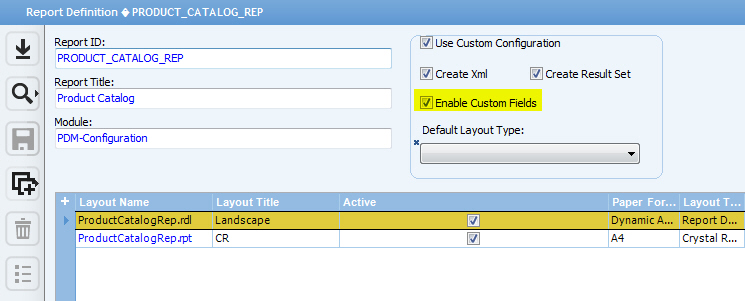
Entire Report can be enabled or disabled for custom fields, this can be done
from the report definition.
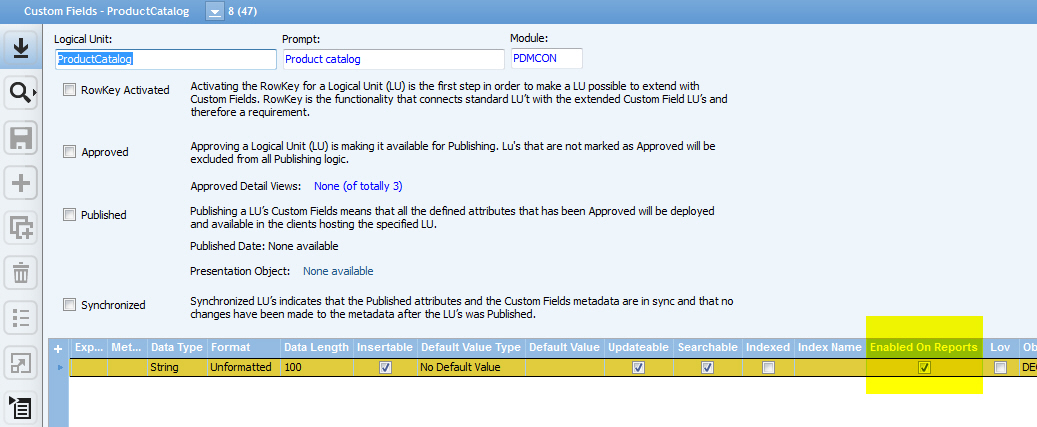
Each Custom filed can be individually controlled, whether its possible to add
it to a report or not, this can be done from the particular custom fields.
In views, it is called objkey, in tables it is called rowkey. If it is missing, you can not use Custom Fields for this LU. Skip it.
Place it as the last simple item just before the first new block!
Check the report Configuration if the report has been enabled for custom fields . Check in IFS Enterprise Explorer that a CF attribute has been added to the LU you are connecting.